
If you're checking how much storage does Genshin Impact take up on mobile in 2026, the short answer is pretty simple: it takes up a lot more space than the App Store or Google Play page makes it seem. On Android, a fresh install usually ends up around 18 GB to 24 GB, while iPhone players are more commonly looking at 20 GB to 26 GB once all required assets finish downloading. With the game now spanning Mondstadt, Liyue, Inazuma, Sumeru, Fontaine, Natlan, and Nod-Krai, the mobile install has grown way beyond what early versions demanded. If you're running out of room, the fastest fixes are still the same: keep only one voice pack, clear old cache buildup, and do a clean reinstall every few major updates.

Genshin Impact Mobile Storage Size 2026
The listed download size is only part of the story. What actually matters is the final installed footprint after the game finishes pulling world data, voice files, shaders, and patch leftovers.
On Android, a clean install with just one voice language usually lands somewhere between 18 GB and 21 GB. That said, if you've been updating the same install for months—or even years—it's pretty common to see the total climb to 23 GB, 24 GB, or even 25 GB because of leftover OBB fragments and patch files that never got fully cleared out. Android's APK + OBB structure is part of the reason this happens, especially during version transitions.
On iPhone, things are a little more efficient thanks to Apple's App Thinning, which removes some unnecessary assets depending on the device. Even so, the real-world install size still tends to sit around 20 GB to 26 GB. A fresh install on a newer iPhone will usually stay near the lower end, while an account that has been patched continuously since the 4.x era can end up noticeably heavier.
| Platform | Fresh Install (1 Voice Pack) | Long-Term Patched Install | Required Free Buffer |
|---|---|---|---|
| Android | 18–21 GB | 22–25 GB | +3–4 GB |
| iPhone (App Thinning) | 20–23 GB | 23–26 GB | +3–4 GB |
One thing you really should not ignore is the extra free space buffer. Genshin doesn't just overwrite old files instantly during updates—it stages patch data first, then applies it. In practice, you want at least 3 GB to 4 GB of free storage beyond the game's installed size, or you're much more likely to run into failed downloads or broken patch installs.
Why Genshin Impact Takes So Much Storage on Mobile
The main reason Genshin Impact is so heavy on mobile is that it was never built like a lightweight mobile-only game. It shares a lot of its asset pipeline with the PC and console versions, which means you're dealing with large environment files, high-resolution textures, voiced quests, cutscenes, and region-specific audio that all need to live on your device.
Every major region adds another layer of storage pressure. Inazuma, Sumeru, Fontaine, Natlan, and now Nod-Krai all come with their own terrain textures, ambient sound sets, NPC dialogue, quest scenes, and map assets. That world data stacks up fast.
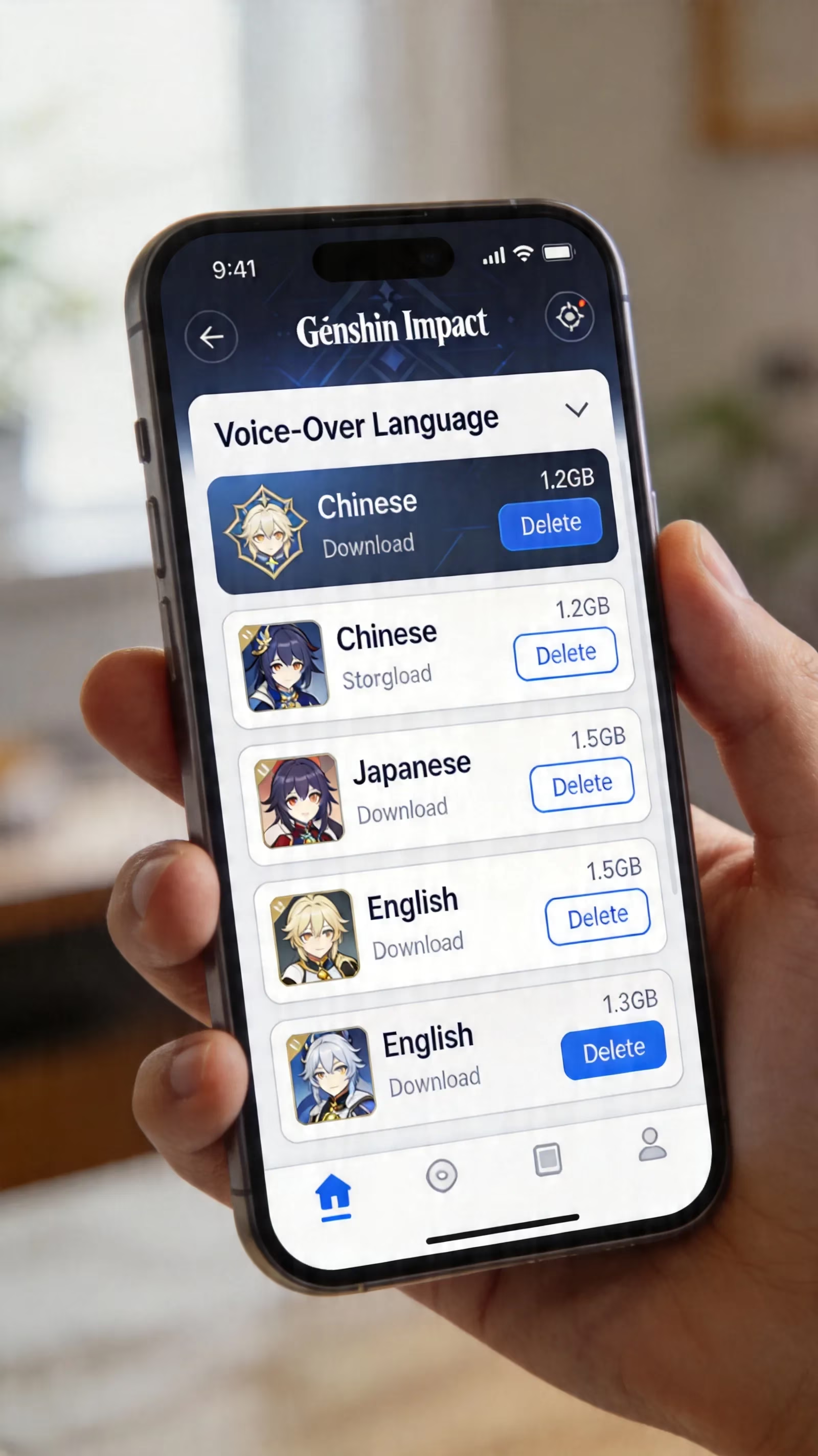
The biggest storage variable you can actually control is voice packs. By 2026, each language track—Chinese, Japanese, English, or Korean—usually takes around 3.5 GB to 5 GB. If you've downloaded all four, you're potentially carrying 14 GB to 20 GB of audio files alone, which is honestly massive for a mobile game.
There are also the less obvious culprits:
-
Shader cache: After a major patch or GPU driver change, the game rebuilds compiled shader files. These can grow to roughly 800 MB to 1.5 GB.
-
Patch residue: Old update bundles sometimes linger longer than they should, especially on long-running installs.
-
Event files: Seasonal events, temporary UI themes, and map overlays may stick around until a full version cleanup happens.
-
Preload data: Upcoming banners, quests, and region assets can start taking space before the patch even goes live.
That slow storage creep is why veteran players often notice the game getting bigger even when they haven't consciously downloaded anything new.

How Much Storage Does Genshin Impact Take Up on Mobile by Setup
When people ask how much storage does Genshin Impact take up on mobile, the real answer depends a lot on how their game is set up.
A one voice pack setup is the leanest option. If you're using a single language and the install is relatively fresh, you're usually looking at around 18–20 GB on Android and 20–22 GB on iPhone. For most players trying to save space, this is the target setup.
A multiple voice pack setup pushes the total up quickly. Every extra language adds another 3 GB to 5 GB, so running both English and Japanese at the same time can easily put you in the 22–26 GB range before long-term patch bloat even enters the picture.
A low-storage phone scenario is where things get rough. On a 64 GB device, the operating system and basic apps already eat up around 15 GB to 20 GB. Once Genshin takes another 20 GB to 25 GB, you don't have much breathing room left for screenshots, videos, social apps, or future updates. If you're on a phone like this, active cleanup is basically mandatory.
A long-term player setup is usually the heaviest of all. If you've had the same install since 2021 and just kept patching forward, the game can realistically balloon to 26 GB to 30 GB. At that point, you're probably carrying old patch fragments, event leftovers, and duplicate asset bundles that were never fully purged. For accounts in this state, a full reinstall is usually the best fix by far.
Genshin Impact Mobile Storage Cleanup Guide
+ Android cleanup steps
On Android, the safest first move is clearing cache through system settings instead of poking around in the game files manually. Go to Settings → Apps → Genshin Impact → Storage, then tap Clear Cache. This usually removes temporary patch files, shader cache, and other junk data without touching your account progress.
Before you do anything bigger, check how much space is listed under Cache versus Data. Cache is safe to remove. Full app data is a different story and should only be touched if you've already confirmed your account is linked to a HoYoverse login.
If the total app size has crept past 25 GB, and you haven't reinstalled in more than two major versions, a simple cache clear may not be enough anymore. In that case, a clean reinstall often works better than trying to trim things piece by piece. After major expansions, reinstalling from the official source can cut 2 GB to 4 GB off the total footprint.
+ iPhone cleanup steps
On iPhone, the easiest built-in option is Offload App. You can find it under Settings → General → iPhone Storage → Genshin Impact. This removes the app itself and some cached files, while keeping documents and certain local data intact.
After offloading, reinstalling from the App Store gives you a cleaner build instead of stacking another patch on top of an already bloated install. It's not always as effective as a full delete-and-reinstall, but it can still recover a decent amount of space.
Before you offload or delete anything, make sure your account is properly linked. Check Settings → Account → User Center inside the game and confirm it's bound to a HoYoverse ID, Apple ID, or Google account. If the account isn't linked, deleting the app can wipe access to that local profile for good.
+ Biggest space savers
If you want the highest-impact fixes first, these are the ones that matter most:
- Delete unused voice packs
Go to Settings → Audio → Manage Downloaded Voices. This can free up 3.5 GB to 10 GB depending on how many extra languages you have installed.
- Remove screenshots and recorded clips
Genshin captures can pile up surprisingly fast. For active players, this often clears 500 MB to 2 GB.
- Keep 3–4 GB of update headroom
This doesn't directly reduce current usage, but it prevents failed updates and broken partial installs, which are way more annoying to fix later.
- Reinstall after major version buildup
If you've patched through several big updates in a row, this is often the cleanest way to remove hidden residue.
Genshin Impact Mobile Storage Mistakes to Avoid
The biggest mistake is deleting random folders manually from the game's storage directory. On Android especially, Genshin uses an internal manifest tied to its OBB structure. If you remove the wrong folder, the game can no longer verify its files properly and may force a full redownload.
Another bad move is installing or moving the game to slow SD card storage. Even decent UHS-I cards can struggle with the read speeds Genshin expects, especially when loading new regions or streaming textures during teleporting. Internal storage is still the only reliable place for the game itself.
You also should not clear full app data on an unlinked account. If you hit Clear Data before binding your account to HoYoverse, Apple, or Google, you risk losing local access to your progress entirely. That includes your characters, Primogems, and Adventure Rank. It takes barely any time to link the account, so do that first—always.
And then there's patch space. A lot of players wait until the phone throws a storage warning, but by then you're already in a risky spot. Genshin often needs about 150% of the patch download size as temporary working space during installation. So if a patch is 4 GB, you may need roughly 6 GB free for it to install properly.
Genshin Impact Mobile Storage FAQ
Can 64GB phones cope with Genshin Impact in 2026?
Yes, technically—but it's not comfortable. After the operating system and default apps, a 64 GB phone usually has around 45 GB to 50 GB of usable space. If Genshin takes 20 GB to 25 GB and still needs a 3 GB to 4 GB update buffer, you're left with very little room for everything else. If you're using a 64 GB device, sticking to one voice pack is basically non-negotiable.
Does clearing cache delete progress?
No. Cache clearing only removes temporary files like shaders, patch leftovers, and render data. Your actual progress—characters, Primogems, Adventure Rank, and account state—is stored server-side and isn't erased by a normal cache clear.
Why does the size grow again after cleaning?
Because the game rebuilds what it needs. As you revisit regions, trigger events, or install a new patch, Genshin starts caching assets again. Shader data also comes back after driver changes or major updates. That growth is normal, even if it's a little annoying.
What storage size is best for future patches?
For long-term play, 128 GB internal storage is the practical minimum in 2026. That's the point where you can keep Genshin installed, leave room for updates, and still use your phone normally. If you're planning to stick with the game through future 6.x content and beyond, 256 GB is the much safer upgrade path.
Conclusion
So, in real terms, how much storage does Genshin Impact take up on mobile in 2026? For a clean, lean setup, you're looking at around 18 GB on Android and 20 GB on iPhone. For older installs with extra voice packs and patch buildup, it's very easy to end up above 26 GB. For most players, the realistic planning number is 22 GB to 24 GB, plus another 3 GB to 4 GB of free space for updates.
If you're trying to fix storage problems fast, start with the biggest win: remove extra voice packs. After that, if your install has been patched nonstop for multiple major versions, a clean reinstall is usually the next best move. As long as your account is properly linked first, both fixes are safe—and they make a huge difference when you're trying to keep Teyvat running smoothly on mobile.